> ## Documentation Index
> Fetch the complete documentation index at: https://docs.everprotec.com/llms.txt
> Use this file to discover all available pages before exploring further.
# Webhooks
> Get started with receiving webhook requests.
## Enable Webhook Messages
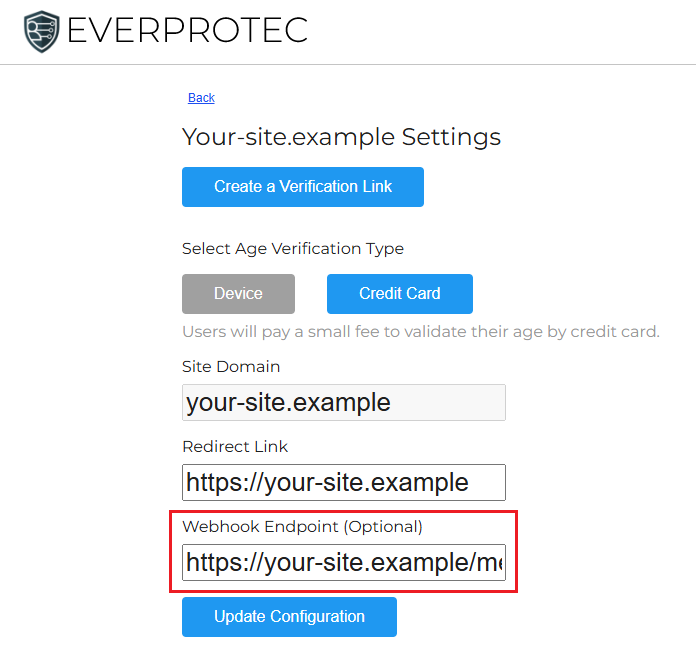
In the settings page for your site located on the [website dashboard](https://dashboard.everprotec.com/web), you can designate an endpoint where you want to receive webhook messages when a verification session is completed. If a valid URL is entered into this field, we will attempt to send messages to this location.
 ## Receiving the Webhook Messages
In order to make sure you have securely received a webhook message from us, we sign each webhook message using the webhook secret that is generated for your web settings configuration. You can locate the **Webhook Secret** in the **App Keys** section of your website settings page.
## Receiving the Webhook Messages
In order to make sure you have securely received a webhook message from us, we sign each webhook message using the webhook secret that is generated for your web settings configuration. You can locate the **Webhook Secret** in the **App Keys** section of your website settings page.
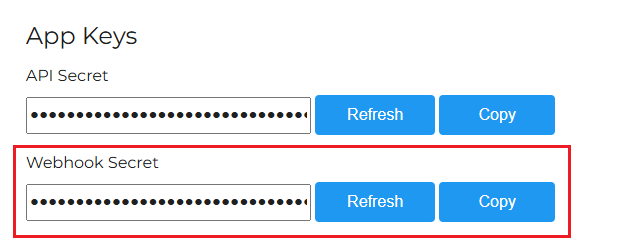 Once you have located your secret, you can replace the value for *EVERPROTEC\_WEBHOOK\_SECRET* in the example code below to verify the signature matches the message we sent.
```javascript Example Node.js Webhook Receiver Using Express theme={null}
const express = require('express');
const crypto = require("crypto");
const app = express();
app.use(express.json());
//Configs and Secrets (Retrieve from an environment file)
const EVERPROTEC_SIGNATURE = "X-Everprotec-SHA256";
const EVERPROTEC_WEBHOOK_SECRET = "replace_this_with_your_webhook_secret";
app.post('/api/webhook', (req, res) => {
if (req.get(EVERPROTEC_SIGNATURE)) {
//Get Signature Header
const signature = Buffer.from(req.get(EVERPROTEC_SIGNATURE));
//Calculate the HMAC
const hmac = crypto.createHmac("sha256", EVERPROTEC_WEBHOOK_SECRET);
const digest = Buffer.from(hmac.update(JSON.stringify(req.body)).digest("hex"),"utf8");
//Compare HMACs
if (signature.length !== digest.length || !crypto.timingSafeEqual(digest, signature)) {
return res.status(401).send('Header signature does not match the content.');
}
//If you made it here, you've received a valid message!
console.log(req.body);
res.status(200).send("Success");
} else {
res.status(400).send("Missing signature header.");
}
});
const port = 3002;
app.listen(port, () => console.log(`Webhook listener started on port ${port}`));
```
## Understanding the Webhook Receiver
The first step to processing the message requires that the signature is retrieved from the header of the request to your endpoint. This signature is unique for each message and acts like a fingerprint that allows you to detect if the message was changed or came from an invalid sender.
```javascript theme={null}
//Get Signature Header
const signature = Buffer.from(req.get(EVERPROTEC_SIGNATURE));
```
Next, generate the [HMAC](https://en.wikipedia.org/wiki/HMAC) from the message using the **Webhook Secret** and use this HMAC to recreate the signature. The recreated signature is stored in the *digest* field in the snippet below.
```javascript theme={null}
//Calculate HMAC
const hmac = crypto.createHmac("sha256", EVERPROTEC_WEBHOOK_SECRET);
const digest = Buffer.from(hmac.update(JSON.stringify(req.body)).digest("hex"),"utf8");
```
Finally, compare the original signature against the version you recreated using a timing safe comparison to ensure details about your secret aren't leaked.
```javascript theme={null}
//Compare HMACs
if (signature.length !== digest.length || !crypto.timingSafeEqual(digest, signature)) {
return res.status(401).send('Header signature does not match the content.');
}
```
If the signatures match, you have a received a valid message! Click [here](/api-reference/webhook/verification-success) to view the details on [webhook messages for successful verifications](/api-reference/webhook/verification-success).
It is recommended to return a 200 status before you begin processing the data in the message to ensure your endpoint is not flagged and disabled for too many timeouts.
Once you have located your secret, you can replace the value for *EVERPROTEC\_WEBHOOK\_SECRET* in the example code below to verify the signature matches the message we sent.
```javascript Example Node.js Webhook Receiver Using Express theme={null}
const express = require('express');
const crypto = require("crypto");
const app = express();
app.use(express.json());
//Configs and Secrets (Retrieve from an environment file)
const EVERPROTEC_SIGNATURE = "X-Everprotec-SHA256";
const EVERPROTEC_WEBHOOK_SECRET = "replace_this_with_your_webhook_secret";
app.post('/api/webhook', (req, res) => {
if (req.get(EVERPROTEC_SIGNATURE)) {
//Get Signature Header
const signature = Buffer.from(req.get(EVERPROTEC_SIGNATURE));
//Calculate the HMAC
const hmac = crypto.createHmac("sha256", EVERPROTEC_WEBHOOK_SECRET);
const digest = Buffer.from(hmac.update(JSON.stringify(req.body)).digest("hex"),"utf8");
//Compare HMACs
if (signature.length !== digest.length || !crypto.timingSafeEqual(digest, signature)) {
return res.status(401).send('Header signature does not match the content.');
}
//If you made it here, you've received a valid message!
console.log(req.body);
res.status(200).send("Success");
} else {
res.status(400).send("Missing signature header.");
}
});
const port = 3002;
app.listen(port, () => console.log(`Webhook listener started on port ${port}`));
```
## Understanding the Webhook Receiver
The first step to processing the message requires that the signature is retrieved from the header of the request to your endpoint. This signature is unique for each message and acts like a fingerprint that allows you to detect if the message was changed or came from an invalid sender.
```javascript theme={null}
//Get Signature Header
const signature = Buffer.from(req.get(EVERPROTEC_SIGNATURE));
```
Next, generate the [HMAC](https://en.wikipedia.org/wiki/HMAC) from the message using the **Webhook Secret** and use this HMAC to recreate the signature. The recreated signature is stored in the *digest* field in the snippet below.
```javascript theme={null}
//Calculate HMAC
const hmac = crypto.createHmac("sha256", EVERPROTEC_WEBHOOK_SECRET);
const digest = Buffer.from(hmac.update(JSON.stringify(req.body)).digest("hex"),"utf8");
```
Finally, compare the original signature against the version you recreated using a timing safe comparison to ensure details about your secret aren't leaked.
```javascript theme={null}
//Compare HMACs
if (signature.length !== digest.length || !crypto.timingSafeEqual(digest, signature)) {
return res.status(401).send('Header signature does not match the content.');
}
```
If the signatures match, you have a received a valid message! Click [here](/api-reference/webhook/verification-success) to view the details on [webhook messages for successful verifications](/api-reference/webhook/verification-success).
It is recommended to return a 200 status before you begin processing the data in the message to ensure your endpoint is not flagged and disabled for too many timeouts.